Worker Threads vs Cluster vs Child Process in Node.js
Clear benchmarks on startup, memory & IPC. When to use worker threads, cluster or child_process, plus a production-ready worker pool pattern.
On this page 11 sections
A request comes in, one function spends 400 ms on the CPU, and every other request waits behind it. p99 drifts away from p50. Then someone opens a “Scaling Strategy” doc, and the first line asks whether to use worker threads or cluster.
That’s the wrong question. The two tools fix different problems, and production apps often run both. This post measures what each option costs, shows a worker pool and cluster setup I’d put in production, and ends with a decision table you can paste into that doc.
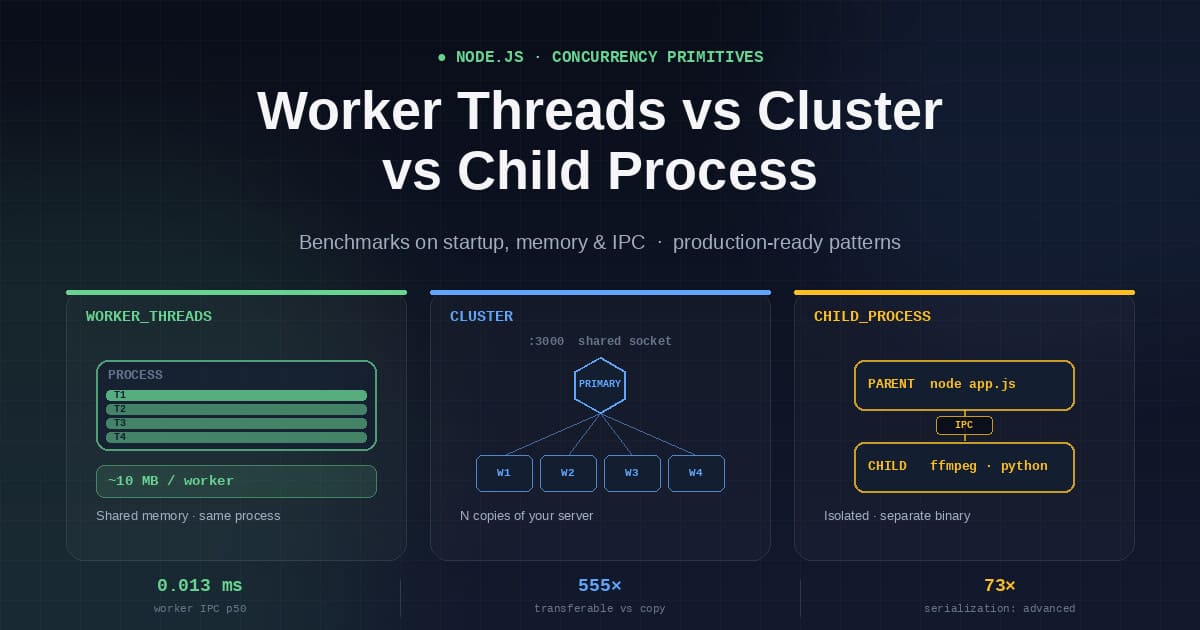
Quick answer
- Use
cluster(or more container replicas) to handle more requests per second on a multi-core machine. - Use
worker_threadswhen a single function blocks the event loop for tens of milliseconds or more: hashing, image resizing, PDF rendering, parsing a 20 MB JSON body. - Use
child_processto run something that isn’t your Node app, likeffmpeg, a Python script or untrusted code, or anything that must be able to crash without taking your server down.
If you’re asking because the API feels slow, profile it first. Worker threads do nothing for I/O-bound work. When the time goes to database queries or HTTP calls, the event loop is already handling it well, and the fix is in the query or the connection pool.
At a glance
worker_threads |
cluster |
child_process |
|
|---|---|---|---|
| Unit | OS thread, same process | OS process (a fork) |
OS process |
| Runs | JavaScript from your app | Copies of your server | Any executable |
| Shared memory | Yes, SharedArrayBuffer |
No | No |
| Messaging | postMessage, transferables |
IPC channel | IPC (fork) or stdio |
| Idle memory (measured) | ~10 MB | ~46 MB | ~46 MB (fork) |
| A crash takes down | the worker, unless handled | one worker process | the child only |
| Fixes | Latency (a blocked loop) | Throughput | Isolation |
Is Node.js single-threaded?
Your JavaScript is. The process isn’t.
libuv keeps a thread pool, four threads by default and resizable with UV_THREADPOOL_SIZE, for filesystem calls, DNS lookups, zlib and some crypto. Your own code runs on one thread inside one event loop. If the event loop is new to you, read how the Node.js event loop works before going further.
That leaves two ways to get into trouble:
- You block the loop. A synchronous, CPU-bound function stalls every open connection. That shows up as latency.
- You saturate the loop. No single call takes long, but one core can’t keep up with the total work. That shows up as a throughput ceiling.
Each tool targets one of these. cluster runs N copies of your server that share a listening socket, which raises throughput. worker_threads moves the blocking function off the loop but keeps it in your process, which fixes latency. child_process runs something else as a separate process that can die without taking you with it.
Most scaling docs go wrong by treating these two problems as one.
How each primitive works
child_process
child_process starts a separate OS process with its own V8 instance, heap and event loop. There are four ways to create one:
| Function | Uses a shell | stdout | IPC channel |
|---|---|---|---|
spawn |
no | streamed | no |
exec |
yes | buffered | no |
execFile |
no | buffered | no |
fork |
no | streamed | yes (process.send) |
fork is spawn specialised for running another Node script with a message channel attached. Its default serialization is slow for binary data, as Benchmark 5 shows.
Streamed stdout is a Readable stream, so large outputs from spawn follow the usual backpressure rules. Buffered output from exec stops at maxBuffer (1 MB by default), and the child is killed if it writes more.
Security note:
execruns your command through a shell. If any part of the command string comes from user input, you have a command injection bug. UseexecFilewith an argument array, and validate the input anyway. The Node.js security checklist covers the rest.
cluster
cluster is child_process.fork() plus one addition: every worker can accept connections on the same port. I covered the basics and the IPC messages in clustering and IPC in Node.js. This section covers what changes in production.
On every platform except Windows, the default scheduling policy is SCHED_RR. The primary process owns the listening socket, accepts each connection and passes it to a worker in round-robin order. With SCHED_NONE, every worker calls accept() on the shared socket and the kernel picks the winner. That skips a hop, but the kernel tends to favour whichever worker was idle a moment ago, so under bursty traffic the load spreads less evenly.
Workers share nothing. No memory, no module-level variables, no in-process cache. An in-memory Map cache becomes N caches that disagree with each other. A setInterval job runs N times.
Do you still need cluster with PM2 or Kubernetes?
Usually not. PM2’s cluster mode is the cluster module with restarts and log handling added. On Kubernetes, ECS or another container platform, the common pattern is one Node process per container, with the orchestrator handling replicas, restarts and rolling deploys. Adding cluster inside that gives you two supervisors that don’t know about each other. PM2 inside Docker inside Kubernetes gives you three.
cluster still makes sense on a VM or bare-metal box where nothing else supervises your process, or when pod count is fixed and each pod gets several cores. The code later in this post is written for that case.
worker_threads
A worker thread is a real OS thread inside your process, with its own V8 isolate and event loop. Each isolate has its own heap, so by default there are no shared JS objects and no data races on your arrays. Data moves between threads in three ways:
postMessagecopies the value using the structured clone algorithm.- Transferables hand over an
ArrayBufferwith no copy, and the sender loses access to it. SharedArrayBufferis actual shared memory, coordinated withAtomics.
The third option is the one only threads have. It is also the only one of the three that can give you a data race:
// Both threads see the same 4 bytes. Atomics.add is atomic; counter[0]++ is not.
const shared = new SharedArrayBuffer(Int32Array.BYTES_PER_ELEMENT);
const counter = new Int32Array(shared);

const worker = new Worker('./counter.worker.js', { workerData: shared });
Atomics.add(counter, 0, 1);
Worker threads don’t speed up fs or network calls. Those already leave the main thread through libuv, so moving them to a worker only adds messaging cost.
The benchmarks
Test machine: Node v22.22.2, Linux, Intel Xeon @ 2.10 GHz. Numbers are p50 unless noted.
Caveat: this machine has 1 vCPU. I didn’t benchmark throughput scaling because four workers on one core only compete with each other, and any speedup figure would be wrong. Instead I measured costs that don’t depend much on core count: startup time, memory and message passing. The throughput harness is in the repo, and the section after the code explains what to look for when you run it on multi-core hardware.
Benchmark 1: Startup cost
Time from creating the worker or child to receiving its first message, over 20 runs:
| Primitive | min | p50 | p95 |
|---|---|---|---|
worker_threads |
26.5 ms | 32.6 ms | 91.3 ms |
child_process.fork |
24.2 ms | 29.3 ms | 57.5 ms |
I expected threads to start faster, since they skip fork/exec and don’t load a new process image. On one core they came out even. A new worker still has to build a V8 isolate, and with a single core that work can’t run in parallel with anything else.
The ranking matters less than the scale. Both take tens of milliseconds. If your endpoint normally answers in 5 ms, you can’t create a worker for each request. You need a pool. The mistake I see most often is new Worker() inside a route handler, which turns a 5 ms endpoint into a 40 ms one.
Benchmark 2: Memory per instance
Four idle instances, with RSS summed across the process tree:
| Primitive | Per instance | 4 instances, total |
|---|---|---|
worker_threads |
10.0 MB | 92 MB |
child_process.fork |
45.9 MB | 236 MB |
Of all five results, this one depends least on the hardware, and it has the biggest practical effect. A forked process carries a whole Node runtime: bootstrap code, built-in modules and everything else. A worker thread shares the process’s code and native structures and pays mainly for its isolate and stack.
For a container, that means a 4-worker cluster uses about 180 to 230 MB before your app allocates anything. In a 512 MB container, that’s most of your memory. Four worker threads cost about 40 MB. The Node.js memory management guide explains how to read these RSS numbers.
Benchmark 3: Round-trip message latency
2,000 round trips of a small message:
| Primitive | p50 | p99 |
|---|---|---|
worker_threads |
0.013 ms | 0.099 ms |
child_process |
0.027 ms | 0.792 ms |
Threads were 2x faster at the median and 8x faster at p99. The difference in the tail comes from the transport. The child process channel is a real pipe, subject to kernel buffering and scheduling. A worker’s postMessage is a memory operation followed by a wakeup of the event loop.
If your design sends many small messages per task, this gap adds up quickly.
Benchmark 4: Moving 16 MB
| Method | p50 |
|---|---|
worker.postMessage(buf), structured clone |
66.7 ms |
worker.postMessage(buf, [buf]), transferable |
0.12 ms |
child.send({ buf }), base64 over JSON IPC |
376.6 ms |
Transferring the same buffer was 555x faster than copying it. A transfer only hands over a pointer. Afterwards the sender’s ArrayBuffer is detached and its byteLength is 0. A copy does a real memcpy plus the structured-clone bookkeeping.
If threads pass image buffers, parsed files or columnar data to each other, use transferables. At this size, copying makes the design unusable.
Benchmark 5: One option, 73x faster
fork() takes a serialization option, and the default is 'json'. Sending a 4 MB Buffer:
serialization |
p50 |
|---|---|
'json' (default) |
688.21 ms |
'advanced' |
9.43 ms |
In JSON mode, a Buffer serialises to {"type":"Buffer","data":[7,7,7,...]}: four million numbers written out as text and then parsed back. 'advanced' uses V8’s structured-clone serializer. It handles binary data natively and keeps Map, Set, Date, BigInt and typed arrays intact instead of converting them to plain objects or strings.
// Set this on any fork() that sends more than small JSON messages.
const child = fork('./worker.js', [], { serialization: 'advanced' });
It isn’t faster for everything. For tiny payloads like booleans, short strings and small objects, JSON is about 1.3x faster in execa’s measurements. That’s a few microseconds against hundreds of milliseconds in the case above, so I’d still use 'advanced' for new code.
The repo
The layout below lets you clone and run everything. Benchmark scripts are under bench/, and the reusable production code is under src/.
node-parallelism-bench/
├── package.json
├── tsconfig.json
├── src/
│   ├── pool/
│   │   ├── worker-pool.ts        # reusable worker_threads pool
│   │   └── pool.worker.ts        # worker entry point
│   ├── tasks/
│   │   └── cpu-task.ts           # the CPU-bound work under test
│   └── server/
│       ├── cluster.ts            # cluster primary + graceful shutdown
│       └── app.ts                # the Express app itself
└── bench/
    ├── spawn-cost.mjs
    ├── mem-cost.mjs
    ├── ipc-latency.mjs
    └── throughput.mjs            # run this one on real hardware
The TypeScript is compiled with tsc. On newer Node versions you can run it directly using type stripping once you rename the worker imports to .ts.
src/tasks/cpu-task.ts
Put the actual work in a plain module with no dependencies. It shouldn’t care whether it runs on the main thread, in a worker or in a cluster child. That’s what lets you unit-test it without starting any threads.
// src/tasks/cpu-task.ts
import { createHash } from 'node:crypto';

export interface HashRequest {
  readonly payload: string;
  readonly rounds: number;
}

export interface HashResult {
  readonly digest: string;
  readonly rounds: number;
  readonly durationMs: number;
}

/**
 * Deliberately CPU-bound and synchronous. Stands in for whatever
 * your real blocking function is: image resize, PDF render,
 * regex over a large document, JSON.parse of a 20 MB body.
 */
export function iteratedHash({ payload, rounds }: HashRequest): HashResult {
  const start = performance.now();
  let current = payload;

  for (let i = 0; i < rounds; i++) {
    current = createHash('sha256').update(current).digest('hex');
  }

  return {
    digest: current,
    rounds,
    durationMs: performance.now() - start,
  };
}
src/pool/pool.worker.ts
The worker entry point is short. It unpacks a message, calls the function and sends back the result. Errors go back as messages rather than being thrown, because an uncaught exception terminates the worker thread. Failing one task is cheaper than losing a pool member. The same idea runs through error handling patterns for Node.js.
// src/pool/pool.worker.ts
import { parentPort } from 'node:worker_threads';
import { iteratedHash, type HashRequest } from '../tasks/cpu-task.js';

if (!parentPort) {
  throw new Error('pool.worker.ts must be run as a worker thread');
}

export interface TaskEnvelope {
  readonly id: number;
  readonly request: HashRequest;
}

export type ResultEnvelope =
  | { readonly id: number; readonly ok: true; readonly value: unknown }
  | { readonly id: number; readonly ok: false; readonly error: string };

parentPort.on('message', (task: TaskEnvelope) => {
  try {
    const value = iteratedHash(task.request);
    parentPort!.postMessage({ id: task.id, ok: true, value } satisfies ResultEnvelope);
  } catch (err) {
    parentPort!.postMessage({
      id: task.id,
      ok: false,
      error: err instanceof Error ? err.message : String(err),
    } satisfies ResultEnvelope);
  }
});
src/pool/worker-pool.ts
Pools are easy to get subtly wrong. This one needs a fixed set of workers created once, a task queue, a promise for each task, timeouts, replacement of crashed workers and a clean shutdown.
// src/pool/worker-pool.ts
import { Worker } from 'node:worker_threads';
import { fileURLToPath } from 'node:url';
import { availableParallelism } from 'node:os';
import type { ResultEnvelope, TaskEnvelope } from './pool.worker.js';

const WORKER_URL = new URL('./pool.worker.js', import.meta.url);

interface PendingTask {
  readonly envelope: TaskEnvelope;
  readonly resolve: (value: any) => void;
  readonly reject: (reason: Error) => void;
  timer?: NodeJS.Timeout;
}

export interface WorkerPoolOptions {
  /** Defaults to availableParallelism() - 1, floored at 1. Leave a core for the event loop. */
  readonly size?: number;
  /** Reject a task if a worker hasn't answered in this long. */
  readonly taskTimeoutMs?: number;
  /** Reject new work once the queue is this deep, instead of growing forever. */
  readonly maxQueueDepth?: number;
}

export class WorkerPool {
  readonly #workers: Worker[] = [];
  readonly #idle: Worker[] = [];
  readonly #queue: PendingTask[] = [];
  readonly #inFlight = new Map<number, PendingTask>();
  readonly #busyBy = new Map<Worker, number>();

  readonly #taskTimeoutMs: number;
  readonly #maxQueueDepth: number;
  readonly #size: number;

  #nextId = 0;
  #closing = false;

  constructor(options: WorkerPoolOptions = {}) {
    this.#size = options.size ?? Math.max(1, availableParallelism() - 1);
    this.#taskTimeoutMs = options.taskTimeoutMs ?? 30_000;
    this.#maxQueueDepth = options.maxQueueDepth ?? 1_000;

    for (let i = 0; i < this.#size; i++) this.#spawn();
  }

  #spawn(): void {
    const worker = new Worker(fileURLToPath(WORKER_URL));

    worker.on('message', (result: ResultEnvelope) => {
      const task = this.#inFlight.get(result.id);
      this.#inFlight.delete(result.id);
      this.#busyBy.delete(worker);

      if (task) {
        clearTimeout(task.timer);
        if (result.ok) task.resolve(result.value);
        else task.reject(new Error(result.error));
      }

      this.#idle.push(worker);
      this.#drain();
    });

    // A worker that dies takes its in-flight task with it. Fail that
    // task explicitly, then replace the worker so the pool keeps its size.
    worker.on('error', (err) => this.#retire(worker, err));
    worker.on('exit', (code) => {
      if (code !== 0 && !this.#closing) {
        this.#retire(worker, new Error(`worker exited with code ${code}`));
      }
    });

    this.#workers.push(worker);
    this.#idle.push(worker);
  }

  #retire(worker: Worker, cause: Error): void {
    // 'error' is followed by 'exit', and terminate() also fires 'exit'.
    // Only the first call for a given worker should do anything.
    const wi = this.#workers.indexOf(worker);
    if (wi === -1) return;
    this.#workers.splice(wi, 1);

    const ii = this.#idle.indexOf(worker);
    if (ii !== -1) this.#idle.splice(ii, 1);

    const taskId = this.#busyBy.get(worker);
    if (taskId !== undefined) {
      const task = this.#inFlight.get(taskId);
      this.#inFlight.delete(taskId);
      this.#busyBy.delete(worker);
      if (task) {
        clearTimeout(task.timer);
        task.reject(cause);
      }
    }

    void worker.terminate();
    if (!this.#closing) {
      this.#spawn();
      this.#drain();
    }
  }

  #drain(): void {
    while (this.#idle.length > 0 && this.#queue.length > 0) {
      const worker = this.#idle.pop()!;
      const task = this.#queue.shift()!;

      this.#inFlight.set(task.envelope.id, task);
      this.#busyBy.set(worker, task.envelope.id);

      task.timer = setTimeout(() => {
        this.#retire(worker, new Error(`task ${task.envelope.id} timed out`));
      }, this.#taskTimeoutMs);

      worker.postMessage(task.envelope);
    }
  }

  run<T>(request: TaskEnvelope['request']): Promise<T> {
    if (this.#closing) {
      return Promise.reject(new Error('pool is closing'));
    }
    if (this.#queue.length >= this.#maxQueueDepth) {
      // Backpressure. Shedding load here is far better than an OOM later.
      return Promise.reject(new Error('pool queue is full'));
    }

    return new Promise<T>((resolve, reject) => {
      this.#queue.push({
        envelope: { id: this.#nextId++, request },
        resolve,
        reject,
      });
      this.#drain();
    });
  }

  get stats() {
    return {
      size: this.#workers.length,
      idle: this.#idle.length,
      inFlight: this.#inFlight.size,
      queued: this.#queue.length,
    };
  }

  async close(): Promise<void> {
    this.#closing = true;
    for (const task of this.#queue) task.reject(new Error('pool closed'));
    this.#queue.length = 0;
    for (const task of this.#inFlight.values()) {
      clearTimeout(task.timer);
      task.reject(new Error('pool closed'));
    }
    this.#inFlight.clear();
    await Promise.all(this.#workers.map((w) => w.terminate()));
  }
}
Four details separate this from the typical tutorial pool.
maxQueueDepth. An unbounded queue turns a CPU problem into a memory problem, and the memory problem into a 3 a.m. page. Reject work early, the same way you’d batch and throttle async work elsewhere.
A timeout replaces the worker, not just the task. You can’t interrupt a worker stuck in an infinite loop, and terminate() is the only way to stop it. If you only reject the promise, the stuck thread stays in the pool and keeps using a core.
#retire checks whether it has already run. A crashing worker emits error and then exit, and terminate() emits exit as well. Without that check, one timeout would start two replacement workers, and the pool would grow a little with every failure.
The pool size is availableParallelism() - 1. The main thread still needs a core to accept connections. If the pool uses every core, the thread handling your I/O competes with the threads doing CPU work.
In containers,
os.cpus().lengthreturns the host’s core count, not your CPU quota. A pod limited to 500m on a 64-core node will happily start 63 workers.os.availableParallelism()(Node 18.14+) takes cgroup quotas and CPU affinity into account on most setups. Some libuv versions have reported it wrong under cgroups v2 (nodejs/node#58428), so log the value at startup.
Should you use Piscina instead? For most teams, yes. Piscina is a maintained pool with min/max thread counts, idle timeouts, cancellation through AbortSignal and queue limits. The pool above shows what such a library has to handle, so you know which options to set. Whichever you choose, keep the task module pure so switching later is easy. For cancellation, see the AbortController guide.
src/server/cluster.ts
In a cluster setup, the primary adds throughput and restarts workers that crash. Tutorials usually leave out graceful shutdown. If you kill workers in the middle of requests, those connections drop and show up as 502s on every deploy. For health checks and readiness during shutdown, see Express health checks and graceful shutdown.
// src/server/cluster.ts
import cluster from 'node:cluster';
import { availableParallelism } from 'node:os';
import process from 'node:process';

const WORKER_COUNT = Number(process.env.WEB_CONCURRENCY) || availableParallelism();
const SHUTDOWN_GRACE_MS = 15_000;

if (cluster.isPrimary) {
  console.log(`primary ${process.pid} starting ${WORKER_COUNT} workers`);

  for (let i = 0; i < WORKER_COUNT; i++) cluster.fork();

  // Restart crashed workers, but not during an intentional shutdown,
  // or you'll fork replacements forever while trying to exit.
  let shuttingDown = false;

  cluster.on('exit', (worker, code, signal) => {
    if (shuttingDown) return;
    console.error(`worker ${worker.process.pid} died (${signal || code}); restarting`);
    cluster.fork();
  });

  const shutdown = () => {
    if (shuttingDown) return;
    shuttingDown = true;

    for (const worker of Object.values(cluster.workers ?? {})) {
      worker?.send('shutdown');
    }

    // Backstop: if a worker ignores the request, kill it.
    setTimeout(() => {
      for (const worker of Object.values(cluster.workers ?? {})) worker?.kill('SIGKILL');
      process.exit(1);
    }, SHUTDOWN_GRACE_MS).unref();
  };

  process.on('SIGTERM', shutdown);
  process.on('SIGINT', shutdown);
} else {
  const { startServer } = await import('./app.js');
  const server = await startServer();

  process.on('message', (msg) => {
    if (msg !== 'shutdown') return;
    // Stop accepting new connections, let in-flight requests finish.
    server.close(() => process.exit(0));
  });
}
The primary sets no timers of its own until shutdown starts, so it exits on its own once every worker has gone. The .unref() backstop fires only if a worker ignores the shutdown message.
bench/throughput.mjs
Run this one on hardware with more than one core.
// bench/throughput.mjs
// Usage: node bench/throughput.mjs <baseline|pool|cluster> <concurrency> <duration-s>
import autocannon from 'autocannon';

const [mode = 'baseline', concurrency = '50', duration = '20'] = process.argv.slice(2);

const result = await autocannon({
  url: 'http://localhost:3000/hash?rounds=2000',
  connections: Number(concurrency),
  duration: Number(duration),
});

console.table({
  mode,
  rps: result.requests.average.toFixed(0),
  p50: `${result.latency.p50} ms`,
  p99: `${result.latency.p99} ms`,
  errors: result.errors,
});
What to expect for each mode:
- Baseline, no parallelism. Throughput stays flat as you add connections. Latency grows in step with concurrency, because requests queue in front of the single event loop.
- Worker pool. p99 drops sharply because the loop stays free to accept and answer requests. Throughput improves up to about
cores - 1workers and then levels off. - Cluster. Throughput grows almost linearly with cores until something shared becomes the bottleneck, usually the database connection pool and occasionally the network card. One slow request is still slow, because it still blocks its own event loop.
- Cluster with a pool in each worker. For most CPU-heavy apps, this is the setup to run in production.
To see which mode you’re really in once this is live, track event-loop lag and pool queue depth. The Node.js monitoring guide shows how to export both.
Decision table
| Your situation | Use | Why |
|---|---|---|
| Web server on a multi-core VM, mostly I/O-bound | cluster or PM2 | Throughput grows with cores, and one crash doesn’t take down the others |
| Same server, but on Kubernetes or ECS | more replicas, one process per container | The orchestrator already restarts and scales processes |
| One function blocks the loop for more than ~50 ms | worker_threads pool | Fixes p99 without paying N times the memory |
| Moving large binary data between units of work | worker_threads + transferables | 0.12 ms vs 377 ms for 16 MB |
| Need shared mutable state | worker_threads + SharedArrayBuffer | No other option shares memory |
| Running a non-Node binary (ffmpeg, pandoc, Python) | child_process.spawn | Different language, different process |
| Running untrusted or crash-prone code | child_process | A process boundary contains segfaults and native crashes |
| Task needs its own memory limit | child_process | OS-level limits apply per process; a worker’s resourceLimits caps only its JS heap |
| Long-running background work (cron, queue consumers) | separate deployment | It’s a deployment question, not a parallelism one; keep it out of the web process |
| CPU-heavy and high-throughput | cluster or replicas, plus a pool in each | Cores give throughput; threads keep latency down |
| Under ~10 ms of CPU per request | none of these | Startup and messaging cost more than the work; profile first |
Five mistakes to avoid
1. Creating a worker per request. Workers and forked processes both take tens of milliseconds to start. Keep them in a pool.
2. Leaving serialization: 'json' on fork(). It was 73x slower for binary data in my test. Set it to 'advanced'.
3. Keeping state in memory under cluster. Rate-limit counters, LRU caches and setInterval jobs each exist N times. Move shared state to Redis or a shared SQLite cache, and use a distributed lock for scheduled jobs. Checking cluster.worker.id === 1 looks like it works, but worker IDs keep increasing after restarts, so once worker 1 crashes the job never runs again.
4. Using os.cpus().length in a container. It returns the host’s cores, not your quota. Use availableParallelism() or read /sys/fs/cgroup/cpu.max.
5. Running with an unbounded queue. A pool without a depth limit doesn’t fail outright. It gets slower until the OOM killer steps in. Reject load at a known threshold and return 503 with a Retry-After header.
Frequently Asked Questions
Is Node.js multithreaded? Your JavaScript runs on one thread per event loop. Node itself uses more threads: the libuv pool for file and DNS work, V8’s background threads for garbage collection and compilation, and any worker threads you create.
Are worker threads faster than cluster? They solve different problems. Worker threads start with less memory (10 MB vs 46 MB here) and pass messages 2 to 8x faster, but they don’t add request throughput on their own. Cluster does, by running the whole server several times.
Do worker threads help with database or API calls? No. I/O already runs off the main thread. Workers help only when your JavaScript is doing CPU-heavy work.
Can a worker thread crash the whole process?
An uncaught exception ends only the worker, which emits error and then exit. Memory is different. resourceLimits caps only the worker’s JS heap, while Buffers and native allocations come out of the shared process memory. A worker that allocates too much of that memory can get the whole process killed. Use a child process when that matters.
How many workers should I create?
Start with os.availableParallelism() - 1 for a CPU pool, and one cluster worker per core (or per CPU of pod quota). Then measure event-loop lag and queue depth and adjust from there.
Should I use cluster inside Docker or Kubernetes? Usually not. Run one process per container and scale with replicas. Use cluster only when a single container is given several cores and you can’t run more replicas.
Before you parallelise
Profile first. Run with --cpu-prof, or wrap the function you suspect in performance.now() calls. If requests spend 8 ms on the CPU, none of these tools will help, and the bottleneck is probably your database.
If they spend 400 ms, work through these in order:
- Make the function faster. A 10x algorithmic improvement beats a 4x gain from parallelism, and it doesn’t cost 200 MB. The V8 optimization guide is a good place to start.
- Use an async version if one exists. Callback-based
crypto.pbkdf2runs on the libuv pool, andzlibhas async variants too. That gets you parallelism without adding anything. - Move the work off the loop with a worker pool.
- Add cores with cluster or more replicas.
If you remember one number, make it 10 MB per worker thread vs 46 MB per child process. On memory-limited containers, that difference will shape your architecture more than any throughput chart.
Repo: node-parallelism-bench. It includes the benchmark harness, the pool and the cluster server. Run npm run bench:all on a machine with more cores than mine and open a PR with your numbers.
Related reading
- Understanding the Event Loop in Node.js. What “blocking the loop” means at the level of the loop’s phases.
- Clustering and IPC in Node.js. The
clusterbasics and message passing between the primary and workers. - Node.js Memory Management. Reading RSS and heap numbers like the ones above.
- Express Health Checks and Graceful Shutdown. Keeping deploys free of 502s.
- Monitoring Node.js Applications. Event-loop lag and custom metrics for your pool.
- Production Setup Best Practices. The rest of the production checklist.